Google Fi
Google Fi Satellite Connectivity Support: What Fi Fixes vs Pixel SOS
Clear guide to Google Fi satellite connectivity support: carrier vs Pixel Satellite SOS, official help channels, eligibility, and troubleshooting when SOS will not connect.
- Updated
- 2026-03-31
- Reading time
- 10 min
TL;DR
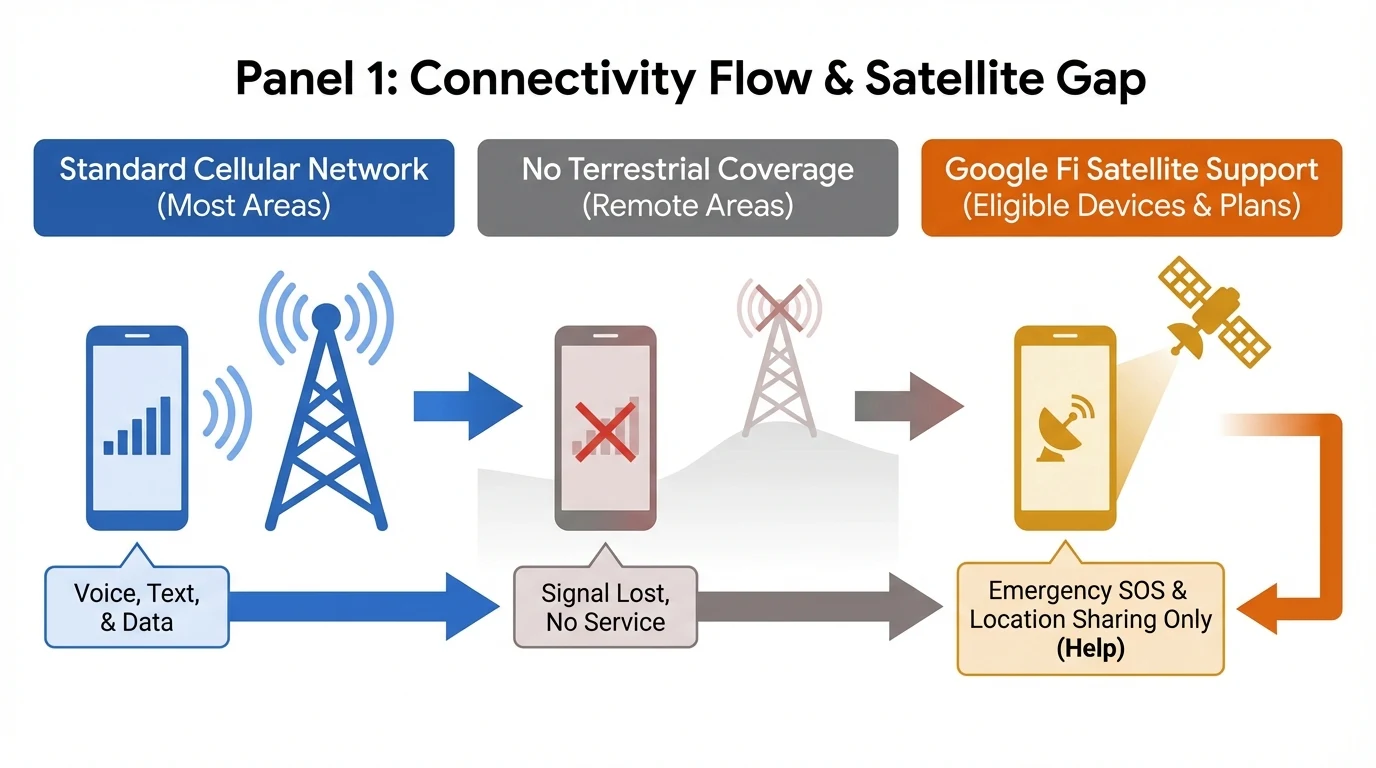
Google Fi does not sell satellite data or voice as a plan feature. Emergency satellite connectivity on compatible Pixels is a device-level Satellite SOS capability; Fi support handles billing and cellular service, while Pixel Help covers SOS activation and hardware.
- Searching "Google Fi satellite connectivity support" usually means either cellular issues or Pixel Satellite SOS—support paths differ.
- Satellite SOS is for emergencies when cellular and Wi‑Fi are unavailable; it is not a substitute for normal Google Fi coverage.
- Use Google Fi Help or 1-844-TALK-2-FI for plan, SIM, and network problems; use Pixel Phone Help or Device Support for Satellite SOS and modem-related issues.
- SOS needs compatible hardware, Google Messages as default SMS, outdoor sky view, and regional availability—confirm in Settings and official help.
What "satellite connectivity" means for Google Fi users
Fi service vs Pixel Satellite SOS
| Topic | Google Fi (carrier) | Pixel Satellite SOS (device) |
|---|---|---|
| Purpose | Calls, SMS, MMS, and data on partner networks | Emergency contact when no mobile or Wi‑Fi signal |
| What you pay for | Fi plan, taxes, optional add-ons | Not a separate Fi "satellite add-on" in plan marketing |
| Where to get support | Google Fi Help, Fi app, phone support | Pixel Phone Help, device repair, Google Store support |
Fi runs over cellular infrastructure (for example T‑Mobile and U.S. Cellular where applicable). Satellite SOS uses satellite links for emergency use on supported hardware, coordinated with your phone’s software—not as a replacement for Fi’s coverage map.
For travel-related cellular behavior (roaming, destinations), see Google Fi vs. international roaming (2026).
Who handles "satellite connectivity support"?
Google Fi Wireless support (account and network)
Contact Fi support when:
- You have no mobile data, dropped calls, or SMS failures that are not specific to Satellite SOS.
- eSIM or SIM activation fails, or the Fi app shows account errors.
- You need plan changes, billing, or compatibility questions for your device on Fi.
Use the official Google Fi Help Center and in-app flows. U.S. users can call 1-844-TALK-2-FI (1-844-825-5234) for live help—confirm the current number on Contact Google Fi support.
For activation-style issues, our walkthrough may help before you escalate: Google Fi eSIM activation failed troubleshooting.
Pixel and Satellite SOS support (emergency satellite feature)
Contact Pixel support when:
- Satellite SOS does not appear in the emergency flow, fails to connect, or drops repeatedly when you have no cellular or Wi‑Fi.
- You need hardware diagnosis (antenna, modem), warranty, or repair options.
- You are verifying whether your device model and region support SOS.
Google publishes dedicated steps under Pixel Phone Help for emergency satellite use; start from the article linked in Primary sources (short link g.co/pixel/satellitesos). Requirements commonly include Google Messages as the default SMS app, outdoor use with a clear view of the sky, and updated software—exact wording changes over time, so prefer the live help article.
Line-of-sight and "it should work but does not"
If SOS struggles even outdoors, obstructions and positioning matter as much as carrier settings. Our deeper technical walkthrough is here: Google Fi Satellite SOS: why "clear sky" is not always enough.
Practical troubleshooting checklist
- Separate the problem — If you still have LTE or 5G bars, your issue is almost certainly cellular troubleshooting, not SOS. Fix data and calls first.
- Update software — Install the latest Android and security updates before calling support.
- Default messaging app — For SOS messaging flows, Google documents Google Messages as the default SMS app; change it in system settings if needed.
- Test SOS only when ethical and legal — SOS is for real emergencies; use official demos or help articles instead of placing false emergency calls.
- Region and device — Availability varies by country and device generation. Check Settings and Pixel Help for your model.
Limitations and safety
Satellite SOS is an emergency backup, not guaranteed in every terrain or weather condition. Response times and behavior depend on satellite visibility, local emergency infrastructure, and software. Always prioritize safety and local emergency guidance.
Disclaimer
This article is informational, not legal or emergency advice. For medical, fire, or police emergencies, follow local procedures. Confirm all plan terms, device eligibility, and support phone numbers on Google’s official sites.
Visual summary
FAQ
Short answers; details are in the article above.
- No. Google Fi plans provide cellular and Wi‑Fi connectivity through partner networks. Satellite connectivity discussed in Fi contexts is typically Pixel Satellite SOS for emergencies, not broadband-style satellite service from Fi.
- For account, SIM, billing, and cellular data issues, use Google Fi Help or call 1-844-TALK-2-FI. For Satellite SOS not connecting, device errors, or eligibility on your Pixel, use Pixel Phone Help or Google Store / device support—Fi agents usually route hardware and SOS questions there.
- Satellite SOS is tied to supported Pixel hardware and software, not to a specific Fi plan. You can use Fi or another carrier; confirm device and region support on official Pixel help pages.
- SOS uses satellites when mobile and Wi‑Fi are unavailable. Poor SOS performance is often line-of-sight, being indoors, old software, or regional limits—not your Fi plan tier. Try open sky, update the phone, and follow Pixel troubleshooting.
- Fi help focuses on wireless service. Pixel documentation covers Satellite SOS steps, requirements, and limitations—that is the primary "satellite connectivity" support surface for Fi users on Pixel.